Terms & Conditions
Everything you need to know about attending classes, rescheduling lessons, payments, refunds, holidays, communication and studying at Firdaws Academy — explained clearly in one place.
Welcome to Firdaws Academy
These Terms & Conditions apply to students enrolled at Firdaws Academy. Please review them carefully so that classes, payments and communication can run smoothly for students, parents and teachers.
After joining: Students and parents may use the Academy Portal, email support or the website Live Chat whenever assistance is required.
Our Gifts & Offers
Trial Lesson
New students can experience Firdaws Academy through one complimentary 30-minute trial lesson.
Referral Gift
When an existing student recommends someone who successfully joins Firdaws Academy, the beneficiary student receives a $20 USD gift.
Send referral details on WhatsApp →01 Classes Attendance & Student Portal +
Time is one of our most valuable resources. Students and teachers are therefore expected to attend lessons promptly at the scheduled time. Delays should be limited to genuine emergencies.
Your Firdaws Academy Portal
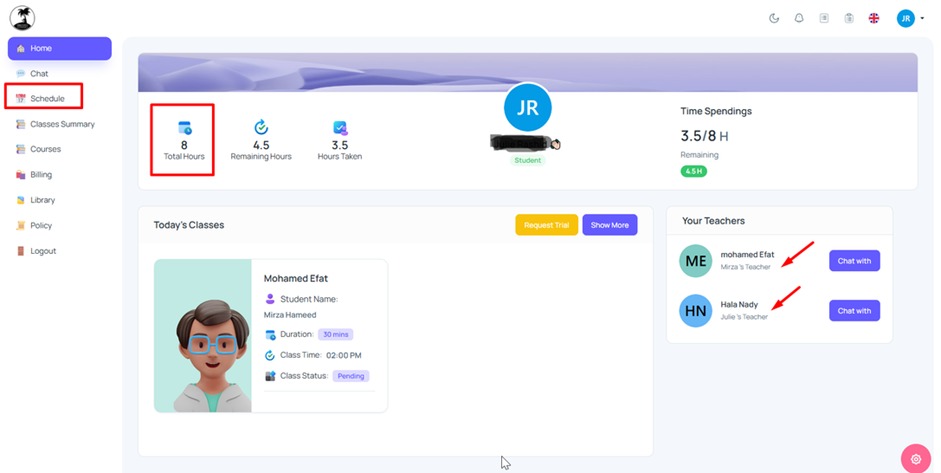
Students and parents can use the Academy Portal to attend lessons, view student profiles, check schedules, follow progress, review reports and manage invoices.
Open Student Portal →Quick Visual Guide to Your Portal
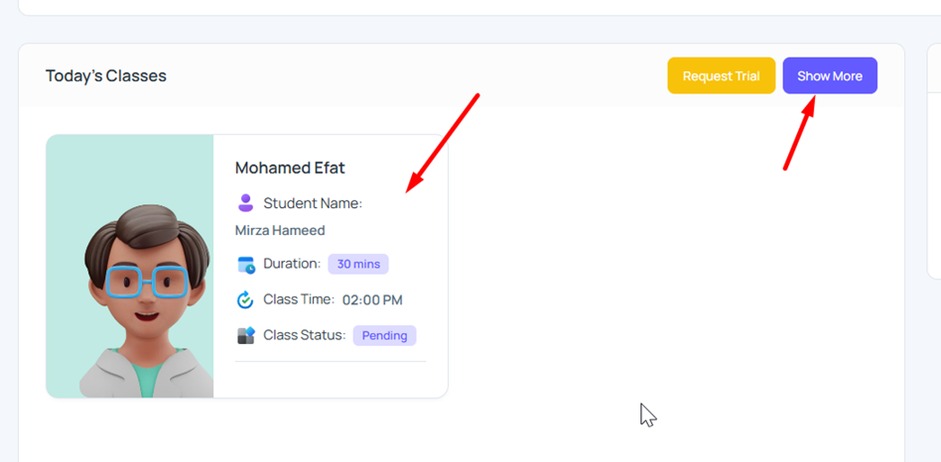
The screenshots below are taken from the official Firdaws Academy student portal and are included here to make the policy and portal features easier to understand.
Cancelling or Rearranging a Class
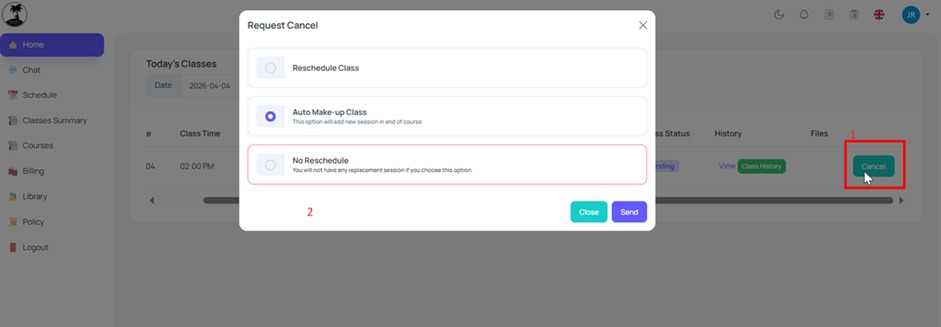
If you would like to cancel a lesson or move it to another time, open the relevant lesson details. Depending on the situation, the Portal provides the following options.
Follow Your Family Members' Progress
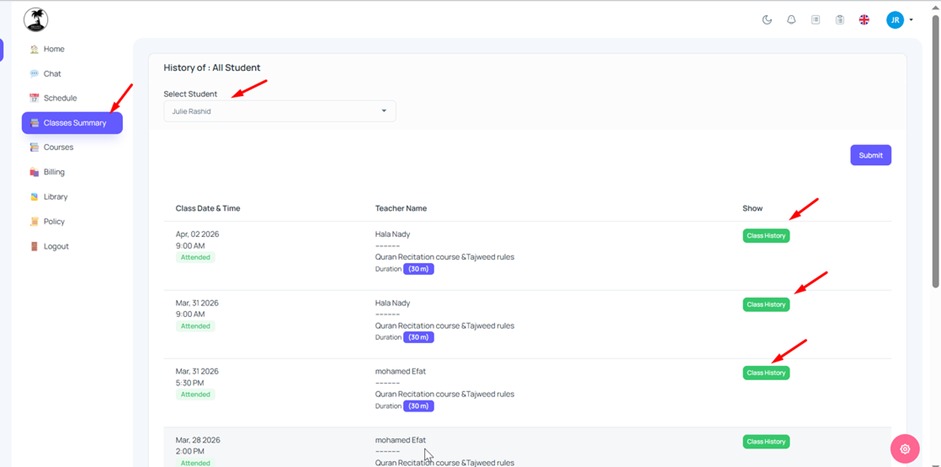
Parents can use the Class Summary area to follow each student's lesson history and progress reports.
Invoices & Billing
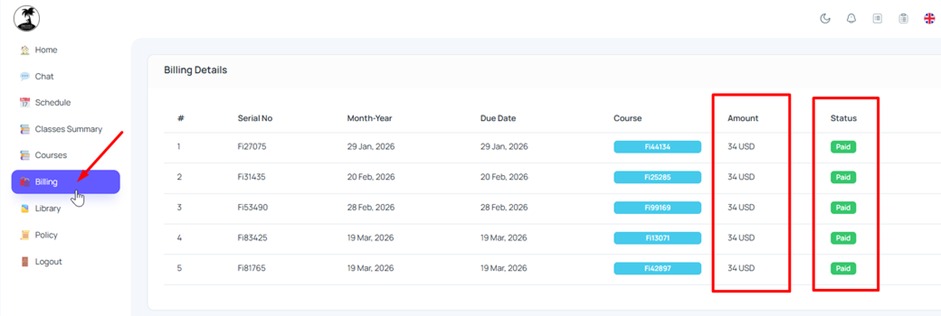
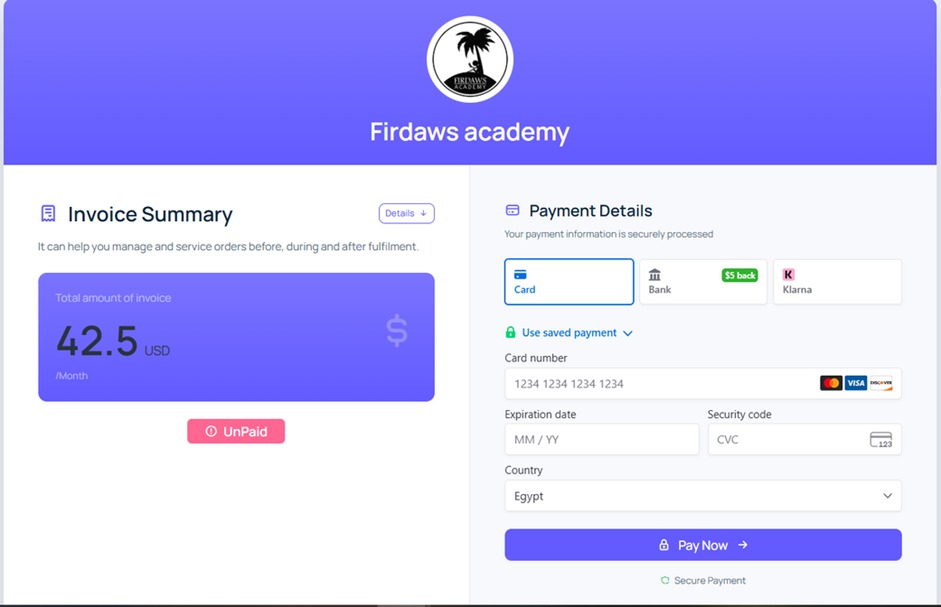
Each student follows an individual study plan, and the Billing area allows students and parents to review invoices, payment status and the payment method linked to the account.
02 Dress Code +
Students should ensure that their clothing is modest and appropriate for Holy Quran classes.
03 Rearranged & Makeup Classes +
Student Holidays
If a student plans to take a holiday or extended break, both the teacher and Academy administration should be informed in advance.
Unpaid Invoices
The next invoice is not issued before the current billing cycle is fully completed and properly actioned in the Portal, including any eligible makeup classes that are still due.
Once an invoice has been issued, it should be settled according to the selected payment method. If an issued invoice remains unpaid, the student's lessons may be paused until the outstanding balance is resolved.
04 Teachers' Punctuality +
Occasionally, a teacher may be unable to attend or may be delayed because of an unforeseen circumstance such as a power outage, internet interruption or medical emergency.
If your teacher is late, you may send a reminder through your Portal profile to confirm that you are online and waiting.
If a teacher is repeatedly late or absent, please contact the Academy support team so the issue can be reviewed promptly.
05 Number of Monthly Classes & Hours +
The number of classes and monthly study hours is agreed upon when the student enrolls.
Students who wish to increase or reduce their study hours should contact the Academy so the study plan and scheduling can be updated.
06 Quality Control +
The Academy continuously monitors teaching quality and the overall learning experience.
- Monitoring student and teacher attendance.
- Following punctuality and classroom discipline.
- Providing ongoing teacher training.
- Collecting feedback from students and teachers.
- Reviewing student progress and Portal reports.
- Following learning performance over time.
07 Class & Progress Reports +
Teachers are required to record lesson times and provide a brief lesson summary after each class.
Students and parents can use these reports to monitor learning progress, understand what was covered and follow the student's development over time.
08 Rating & Feedback +
The Quality Department may contact students or parents after they have attended several lessons to request feedback about their experience.
Please tell us about any concern, question, complaint or suggestion. Your feedback helps us improve teaching quality and student support.
09 Privacy Policy +
Firdaws Academy respects the privacy of both students and teachers.
Personal information should be treated as confidential and must not be accessed, copied, distributed or used without proper authorization.
10 Payment Policy +
After the Trial Lesson
Once the student successfully completes the trial lesson and decides to continue, the initial subscription should be completed before regular lessons begin.
Two Payment Methods: Manual & Automatic
The Firdaws Academy Portal supports two billing methods for ongoing study: Manual Payment and Automatic Payment. The payment method changes how the amount is collected, but it does not change when the next billing cycle is created.
When Is the Next Invoice Issued?
A billing cycle is considered complete when the lessons included in that cycle have been completed and the required class actions have been properly recorded in the Portal.
If an eligible makeup or replacement class is still outstanding, the Academy will complete that makeup first. The next invoice will then be issued — or, for Automatic Payment accounts, the automatic deduction will be processed — after the outstanding makeup class and the current cycle have been completed.
Remaining or Makeup Classes
Students should arrange any eligible remaining or makeup classes with the teacher as soon as possible. These classes are completed before the next billing cycle is issued or automatically charged.
If a student is stopping study instead of continuing to the next cycle, eligible unused classes may be handled under the Academy's Refund Policy.
11 Refund Policy +
Students should notify the Academy at least two days before the intended stopping date.
If the agreed number of study hours has not been completed during a particular month, the student should arrange the remaining classes with the teacher as soon as possible at times suitable for both parties. Where the student is continuing, the next invoice or automatic deduction is processed only after the current cycle and any eligible makeup classes have been completed.
12 Public Holidays +
Firdaws Academy recognizes the two principal Islamic Eid holidays: Eid al-Fitr and Eid al-Adha.
13 Studying Through Firdaws Academy Only +
Students enrolled through Firdaws Academy must continue their lessons with their assigned teacher through the Academy's official system.
14 Leaving the Academy +
If a student decides to leave Firdaws Academy, please notify the administration at least two days before the intended leaving date.
We also appreciate knowing the reason for leaving, as this helps the Academy identify areas that may need improvement.
Contact Support →15 Student Feedback Form +
Students and parents are kindly encouraged to complete the Academy feedback form at the end of their first month and whenever they would like to share additional feedback afterwards.
Your comments help us assess teachers, improve services and provide a better learning experience.
Complete Feedback Form →Still have a question?
If anything regarding your classes, invoices, teacher, schedule or Academy account is unclear, please contact the Firdaws Academy team.